Zuora Salesforce Integration: 3 ways to do it
Managing subscriptions at scale is complex—handling recurring payments, cancellations, upgrades, and invoicing becomes exponentially challenging as your subscriber base grows. When using Salesforce alongside Zuora's Billing platform, integration is crucial for empowering sales, service, and success teams to manage subscribers efficiently. This guide explores three integration approaches - from Zuora's free connector to specialized solutions like Limio for Salesforce.
Introduction
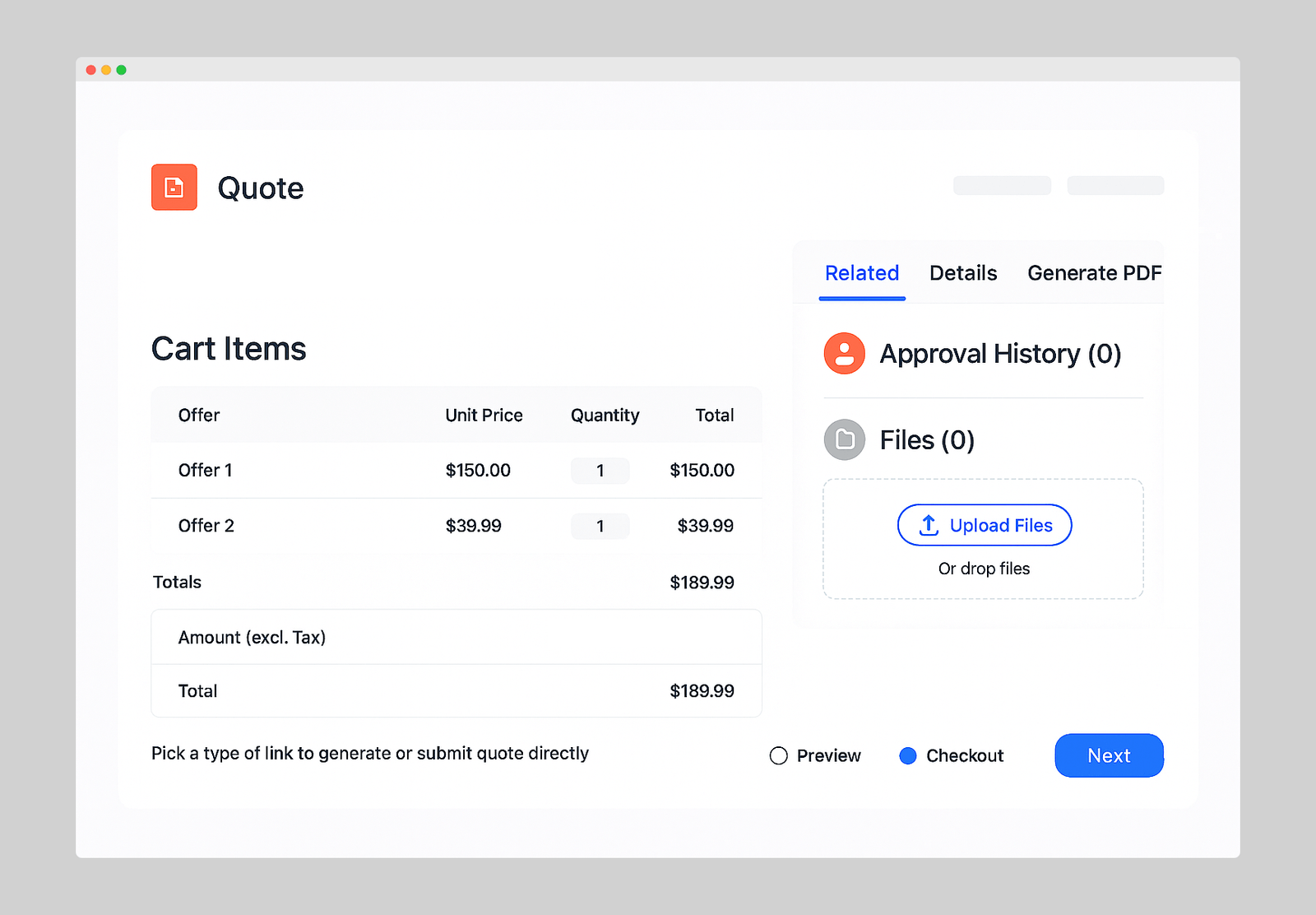
Zuora is a powerful billing tool designed for back-end finance teams to handle subscription billing and payments. However, to truly serve customers well, you need to manage all customer objects—orders, quotes, new orders, upgrades, renewals, and cancellations—in your CRM where front-line, customer-facing teams work. By integrating Zuora with Salesforce (the world's #1 CRM), you enable sales, service, and success teams to seamlessly serve customers without switching between systems.
This article covers three ways to integrate Zuora with Salesforce, including implementation details for teams operating in high-velocity environments.
Introduction to Zuora
Zuora is a cloud-based platform specializing in subscription billing, revenue, and finance solutions. It enables businesses to manage recurring billing, payment processing, and automated subscription services throughout the customer lifecycle.
Key features of Zuora Billing:
- Flexible Subscription Pricing and Packaging: One-time charges, recurring fees, usage-based pricing, and tiered rates
- Automated Billing Operations: Recurring billing cycles, invoice generation, and payment collections
- Diverse Payment Methods and Gateways: Credit/debit cards, bank transfers, PayPal, and integration with multiple payment gateways for global transactions
Introduction to Salesforce
Salesforce
Salesforce provides comprehensive CRM solutions through Agentforce Sales (previously Sales Cloud) and Agentforce Service (previously Service Cloud), both running on the same platform with a shared data model built around Accounts and Contacts.
Agentforce Sales: Empowering Sales Teams
Agentforce Sales centralizes customer information, enabling organizations to manage the entire sales lifecycle from prospecting to closing.
Key features:
- Lead and Opportunity Management: Track leads through the pipeline and convert them into opportunities
- Forecasting and Reporting: Accurate sales forecasts with real-time dashboards and reports
- AI-Powered Insights: Einstein AI prioritizes leads and identifies upsell/cross-sell opportunities
- Collaboration Tools: Integration with Slack and other apps for team alignment
- Mobile Productivity: Access CRM data on the go
When integrated with Zuora, sales teams should be able seamlessly create quotes and orders for new subscriptions, renewals, and upgrades.
Agentforce Service: Elevating Customer Support
Agentforce Service streamlines customer support operations with full visibility into sales interactions, ensuring continuity across the customer journey.
Key features:
- Fast Case Handling: Automated routing, knowledge base access, and streamlined workflows
- 360-Degree Customer View: Complete insight into customer histories, preferences, and transactions
- Omnichannel Engagement: Seamless interactions across phone, email, chat, messaging, and social channels
- AI and Automation: Einstein AI surfaces insights, suggests responses, and automates repetitive tasks
- AppExchange Ecosystem: Thousands of pre-built apps and integrations for industry-specific needs
When connected with Zuora, agents should be able to manage subscription-related inquiries—billing questions, plan changes, or cancellations—ensuring smooth service experiences.
3 Integration Options
You have broadly 3 options:
3. Limio for Salesforce (Bi-directional sync for customer service with ecommerce)Specialized commerce solution integrating Salesforce and Zuora to empower customer service, success, and sales teams in B2C and B2B environments.Key characteristics:
- Configure, price, quote, and manage subscriptions directly within Salesforce
- Omnichannel architecture: Agents initiate quotes in Salesforce, customers complete online via Limio Commerce storefront
- Real-time sync across systems
- Manage renewals, upgrades, cancellations, and in-life changes
- Paid Salesforce Managed Package with no-code/low-code platform
- Bi-directional sync between Salesforce and Zuora
- Configure and customize subscription offerings with dynamic pricing
- Create and update quotes and subscriptions, pushing them to Zuora
- Manage approvals and structure complex deals directly in Salesforce
- Paid add-on delivered via Salesforce Managed Package
- Bi-directional sync between Salesforce and Zuora
- Configure and customize subscription offerings with dynamic pricing
- Create and update quotes and subscriptions, pushing them to Zuora
- Manage approvals and structure complex deals directly in Salesforce
- Paid add-on delivered via Salesforce Managed Package
- Configure, price, quote, and manage subscriptions directly within Salesforce
- Omnichannel architecture: Agents initiate quotes in Salesforce, customers complete online via Limio Commerce storefront
- Real-time sync across systems
- Manage renewals, upgrades, cancellations, and in-life changes
- Paid Salesforce Managed Package with no-code/low-code platform
Learn more about Limio for Salesforce
Stronger together
Limio for Salesforce can work together with Zuora Z360, serving different purposes.
Zuora Z360:
- Data Synchronization: Utilizes a copy sync method to transfer data from Zuora into Salesforce.
- Data Structure: Relies on custom objects within Salesforce's data model for data storage and access.
- Data Depth: Provides comprehensive Zuora data, including subscriptions and invoices, but is granular in nature.
- Modification Restrictions: Data is read-only, meaning changes to subscriptions cannot be made.
- Synchronization Timing: There is a delay in synchronization, typically ranging from 10 to 15 minutes.
Limio for Salesforce:
- Data Synchronization: Features a live sync capability, pulling data 'on-the-fly' from Limio Commerce (which is in turn synchronized with Zuora).
- Data Access: Instead of residing within Salesforce's data model, data is accessed through API and managed via Flows.
- Data Relevance: Only contains data that is relevant to sales or customer service handling, providing a high-level overview.
- Interactivity: Data is actionable, allowing customer service agents to make changes to subscriptions instantly.
- Instant Updates: Any changes made to a subscription are immediately visible within the system.
The essential difference is that Limio for Salesforce is designed for real-time, actionable customer service interaction, enabling immediate subscription changes, while Zuora Z360 offers a more detailed data set useful for in-depth analysis but with a read-only restriction.
Steps to Set Up Zuora Salesforce Integration with Limio for Salesforce
Now that you have learned about Zuora, Salesforce, and Limio, we’ll go through the steps to set up the Zuora Salesforce integration via Limio for Salesforce. For this Integration, you need to get the Limio for Salesforce package from the AppExchange. The steps to adopting the package are listed in the process. The following steps are listed below:
Step 1: Installing the Limio for Salesforce App in Salesforce
- Log in to your Salesforce account here.
- Now go to Limio for Salesforce AppExchange here.
- The new page will show the app listing for the Limio for Salesforce package on AppExchange.
- Now, click on the “Get it now” button to get in touch with Limio.
- Limio will then provide you with an install link.
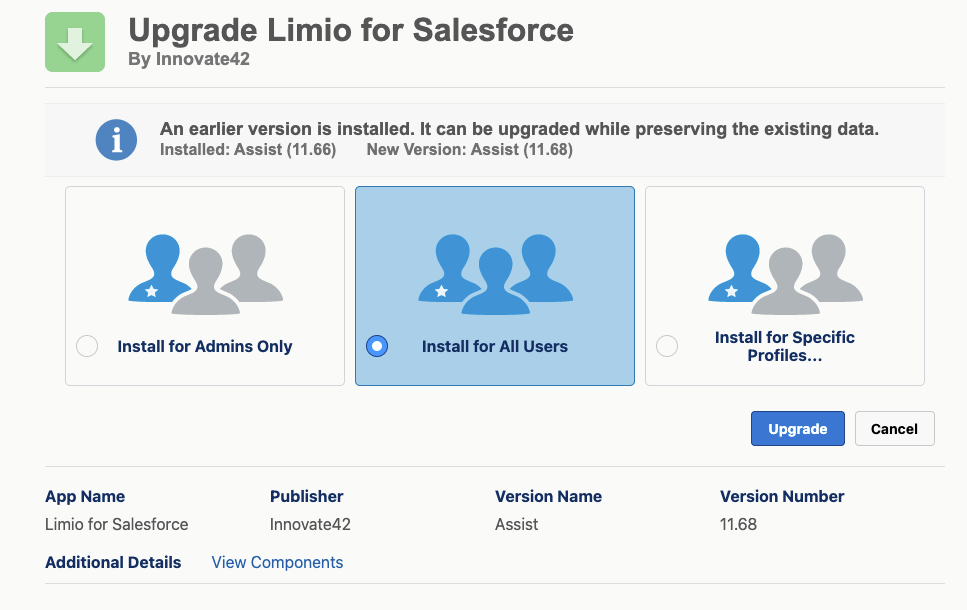
- When prompted, make sure to check "Install for All Users"
Step 2: Configuring the Limio and Zuora Account
The next step is to connect Limio for Salesforce to your Limio Commerce application. This will involve setting up an Authentication Provider and Named Credentials in Salesforce. You will need to:
- Setting Up Authentication
- Creating Authentication Provider in Salesforce:
- Setting Up Named Credentials
These steps ensure a secure and efficient connection between Limio for Salesforce and Limio Commerce for omnichannel commerce. Full details are explained here.
Step 3: Integrating Zuora With Salesforce
To integrate with the Zuora application
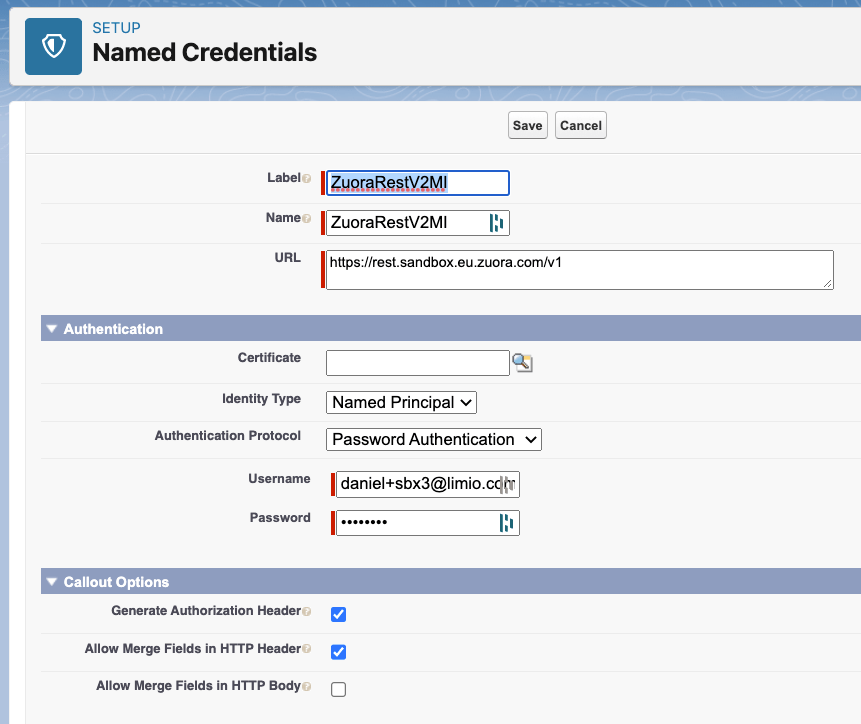
- Start by heading to Setup in your Salesforce dashboard.
- In the Quick Find box, type in Named Credentials and click on it.
- Hit the New Named Credential button to create a new one.Name it ZuoraRestV2MI.
- For the URL field, pop in the endpoint URL you got from Zuora.
- Change the Identity Type to Named Principal
- Pick the right Authentication Protocol, like Password Authentication, that Zuora recommends.
- Enter the Username and Password details that Zuora provided you.
- Click Save to finish setting up your Named Credential.
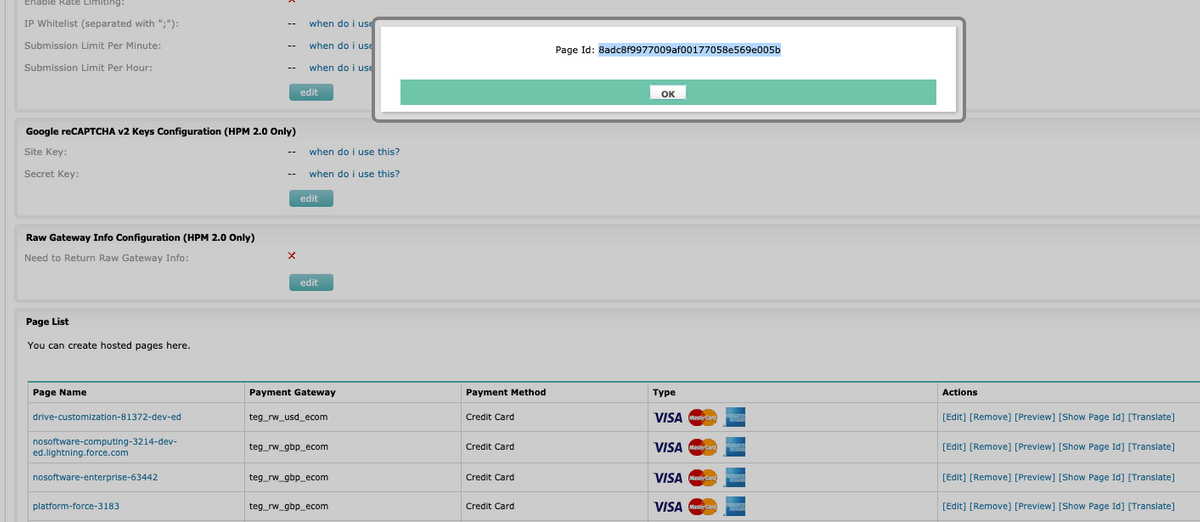
If agents use Zuora to process credit/debit card details or direct debit payments, a hosted payment method (HPM) page must be created in Zuora. Then, copy the Page ID of the HPM page you've created in custom metadata.
Et voilà! You have connected Zuora and Salesforce via Limio for Salesforce.
Benefits of Zuora Salesforce Integration with Limio for Salesforce
Limio for Salesforce allows Zuora customers using Salesforce to empower their customer service and customer success teams to provide better service to their subscribers. Key benefits are:
- Omnichannel commerce that adapts your sales model
Seamlessly blend online, service‑assisted, partner‑led, and AI‑powered journeys into one unified subscription commerce engine. Whether it’s B2C, B2B, or partner‑driven, agents in Salesforce can start or hand off orders and quotes to customers, while partners can self‑serve—all with real‑time sync and visibility across systems. - Lightning-native, low-code workflows for any team
Built using Lightning Flows and Lightning Web Components, Limio for Salesforce empowers teams to manage new orders, quotes, pricing, and subscription changes with intuitive flows—no engineering required. Deploy workflows where they matter most across any Salesforce object or record page. - Configurable quoting, pricing and packaging
Enable sales and customer teams to build and configure quotes, bundle offers, apply promotions or retention discounts, and manage packaging in real time. These tools ensure accurate pricing and streamlined quoting—whether for new business, upgrades, or save offers. - Error-proof operations and unified visibility
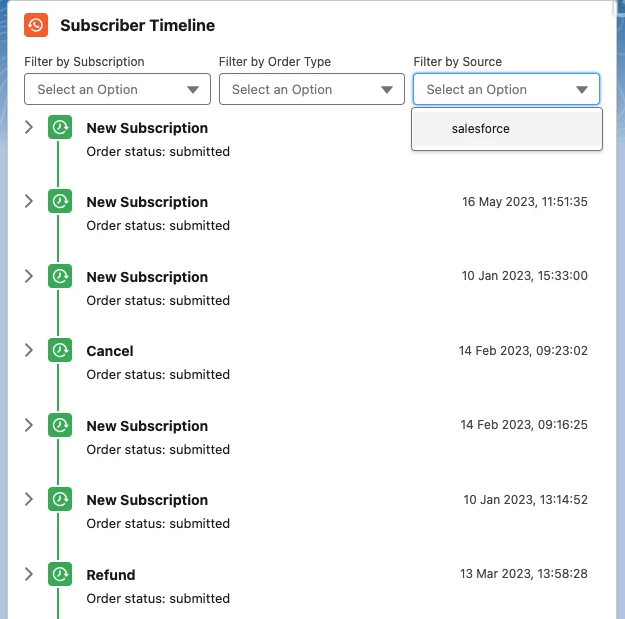
Provide agents with a guided, scripted UI that ensures correct data capture and tracking — from payments to provisioning and entitlements. Every change flows across Salesforce and is backed by real‑time order feedback, ensuring accuracy and full lifecycle traceability. - Visual timeline of the subscriber journey
Quickly see every touchpoint in a customer’s subscription lifecycle—quotes, changes, payments, cancellations—through a unified visual timeline embedded in Salesforce, enabling faster, more informed interactions
Conclusion
When it comes to integrating Zuora with Salesforce, you have several routes depending on your goals: free tools like Zuora 360 (and its successor, the Zuora Connector for Salesforce CRM) deliver read-only, one-way visibility into billing and subscriptions, while solutions like Zuora CPQ X offer sales-focused, bi-directional workflows for quoting and order creation. Yet, if you're looking for a truly native, omnichannel experience—one that works seamlessly across direct sales, customer service, partner channels, and self-serve journeys—then Limio for Salesforce is the clear choice. Built with bidirectional integration for both Salesforce and Zuora, it enables teams to initiate quotes, manage packaging and pricing, process orders, and handle in-life subscription changes across B2B and B2C contexts—all without coding or building separate integrations. Whether the transaction starts with a rep, a partner, a self-serve site, or an AI-assistant, Limio keeps everything unified and visible in Salesforce in real time, making it a powerful and flexible platform for modern subscription commerce.
Your subscription business, on autopilot.
See how Limio can transform your commerce capabilities.