How to Move from Zuora to Stripe Billing
Switching your subscription billing platform can feel daunting – like rewiring the engine of a moving car. Yet many product and operations teams are considering just that: moving from Zuora (a powerful, enterprise-grade billing system) to Stripe Billing (a developer-friendly alternative). Whether it’s to simplify your tech stack, reduce costs, or gain agility, a migration can offer big benefits. But how do you execute this switch without disrupting your business? This guide will walk you through the process step by step, highlighting how to make the transition smoother (spoiler alert: a no-code commerce platform like Limio can take on much of the heavy lifting).
Introduction
Migrating from Zuora to Stripe Billing is a significant project, but with careful planning it’s entirely achievable. Zuora may have been the backbone of your subscription operations – handling complex pricing, subscriptions, and finance workflows – but it also comes with complexity that often requires developer time. Stripe Billing, on the other hand, can offer a more streamlined approach that’s tightly integrated with payment processing (since it’s part of the Stripe ecosystem). For developers, product and RevOps teams, Stripe’s simplicity and user-friendly design can be appealing.
However, moving to Stripe Billing isn’t just flipping a switch. It means transferring large amounts of data, rebuilding integrations, and adapting processes. The good news is that it’s been done successfully by others – and Stripe provides tools to help you import subscriptions without writing custom code. With the right strategy (and possibly the right tools), you can minimize downtime and avoid asking customers to re-enter information. Let’s break down why you might make this move, what challenges to expect, and how to tackle the migration step by step.
Why Consider Switching to Stripe Billing?
Stripe Billing vs. Zuora – what’s the difference? Zuora is known for its rich feature set and flexibility. It can handle complex subscription models, custom billing rules, and integrations with finance systems. Stripe Billing is newer and tends to be simpler and more developer-friendly. Here are a few reasons companies consider switching:
- Unified Payments and Billing: If you already use Stripe to process payments, adopting Stripe Billing puts your subscription management and payments in one place. This can streamline operations and reporting. (With Zuora, you likely had Stripe or another gateway plugged in for payments anyway.)
- Ease of Use: Stripe’s dashboard is often praised for its clean design and ease of use. Product and operations folks might find it easier to navigate day-to-day compared to Zuora’s interface.
- Developer-friendly: Stripe Billing’s APIs and tools can accelerate custom development needed to support basic subscription workflows. In contrast, Zuora’s power sometimes comes with the cost of more configuration and code to get a polished experience.
- Cost Considerations: While exact costs depend on your usage and contracts, Stripe’s pricing model (usually a percentage of transactions with no or low base fees) might be more attractive for some businesses than Zuora’s subscription licensing fees – especially for smaller or mid-sized companies or those with simpler needs.
Of course, every organization is different. Zuora might offer features your business relies on (e.g. advanced revenue recognition, complex discount logic, or specific integrations). It’s important to identify what you might lose or need to replace when moving away from Zuora. But if your subscription model aligns well with Stripe’s capabilities and you value speed and simplicity, Stripe Billing can be a great fit.
Challenges in Migrating from Zuora to Stripe
Before diving into the “how,” let’s acknowledge the key challenges you’ll need to manage during a migration:
- Data Migration: Zuora holds a lot of critical data – customer accounts, payment details, subscriptions (with their history of charges, renewals, etc.), and perhaps product catalog information. You need to accurately migrate this data into Stripe. Mistakes in this area can mean billing errors or unhappy customers. Stripe’s tooling can import subscriptions, but you’ll likely need to export data from Zuora in a compatible format. Migrating payment data (like credit card tokens) is especially sensitive – you’ll want to do this securely so customers don’t have to re-enter their cards (Stripe provides a secure process for migrating stored payment info if you coordinate with them).
- Integration Rework: Think of all the places Zuora touches your business: your website or product (for signup and self-service flows), your CRM (maybe Salesforce integration for sales orders or CPQ), perhaps your financial systems for accounting, and custom scripts for things like provisioning or notifications. All these integrations will need to be re-pointed or rebuilt to work with Stripe’s APIs. This is often the most labor-intensive part of the project. Every API call, webhook, or process that talked to Zuora must be adjusted for Stripe’s way of doing things.
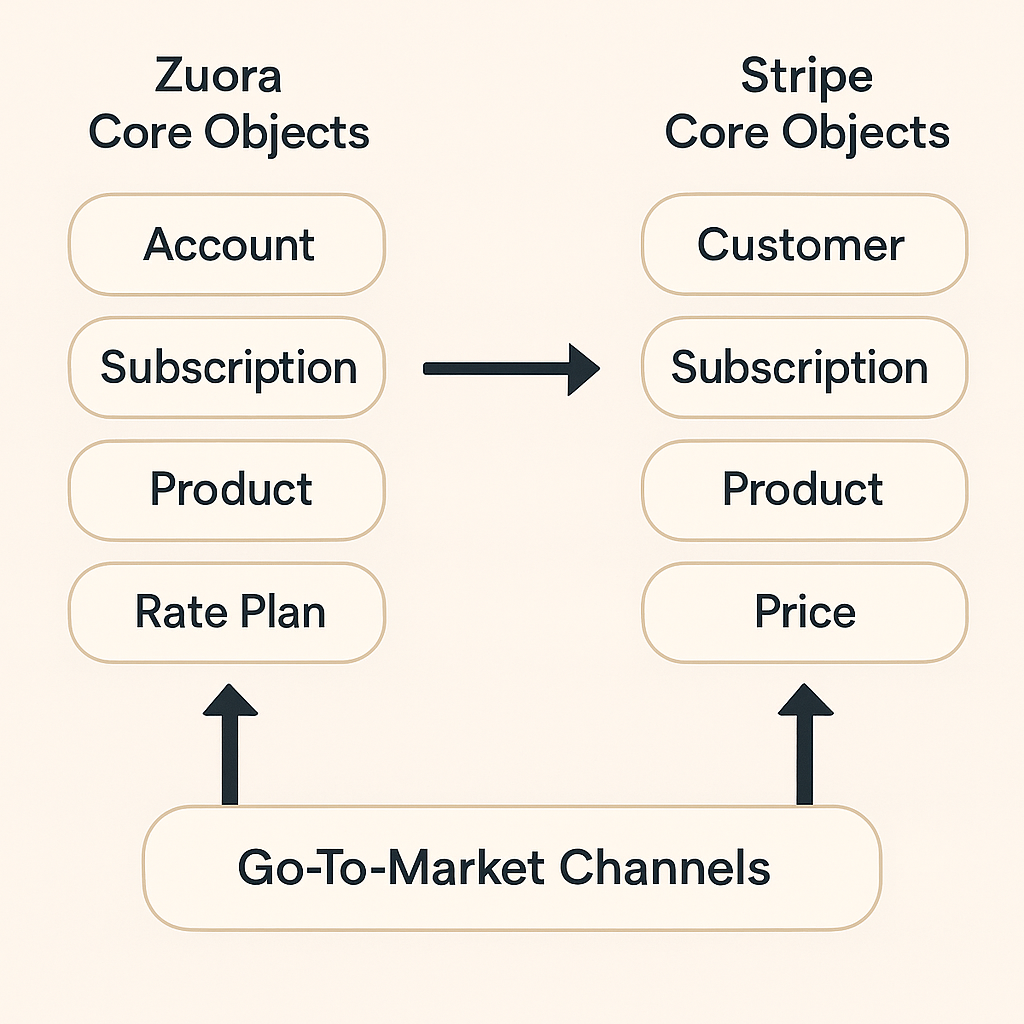
- Feature Gaps and Differences: You’ll likely find that not everything in Zuora has a one-to-one equivalent in Stripe. For example, Zuora’s concept of a product rate plan with multiple charges might translate into multiple Stripe “Products” and “Prices” because Stripe’s model is one price per product offer (at the time of writing). If you used complex billing rules (like specific invoice schedules, advanced proration, or custom amendments), you’ll need to find a new approach in Stripe or possibly simplify your processes. Identifying these differences upfront is crucial so you can design workarounds or confirm you actually don’t need that complexity anymore.
- Operational Change Management: Lastly, remember the human factor. Your finance team might be accustomed to Zuora’s reports and UI; your customer service might know how to quickly look up a subscriber in Zuora; your sales team might be used to specific objects in Salesforce. Moving to Stripe means retraining these users on a new system. There might be temporary productivity dips as people get used to the new tools. Plan for some overlap or additional training resources during the cutover.
None of these challenges are insurmountable. They just need to be addressed methodically. Next, we’ll outline a step-by-step plan to tackle the migration while keeping risks under control.
Step-by-Step Plan for Migrating from Zuora to Stripe Billing
Making the switch requires a well-thought-out game plan. Here’s a step-by-step approach that product and operations teams can follow to move from Zuora to Stripe Billing as smoothly as possible:
- Assess and Clean Up Your Data in Zuora: Start by auditing what you have in Zuora. Which products, rate plans, and pricing models are active? How many customers and subscriptions? Are there any data quirks (such as old plans that need retiring or inconsistent customer info) that you can clean up before migration? It’s often easier to do some cleanup in the old system first, so you’re not migrating unnecessary or messy data. Also, note any custom fields or configurations you rely on – you’ll want to figure out how to handle those in Stripe or in an external system.
- Set Up Your Stripe Billing Environment: If you haven’t already, create a Stripe account (or accounts, if you need separate environments for testing and production). Configure basic settings that Stripe will need: your business info, tax settings (Stripe Tax can help if you plan to use it), and branding for invoices/receipts. Familiarize yourself with Stripe’s Products and Prices model – this will be the core of how subscriptions are represented. In Stripe, a Product is a service or item you sell, and a Price is a specific billing plan for that product (e.g., $X per month). Plan how your existing Zuora product catalog will map into Stripe’s structure.
- Recreate Products and Pricing in Stripe: With your plan in hand, start setting up your offerings in Stripe. For each subscription plan you had in Zuora, you’ll create a Product and a corresponding recurring Price in Stripe. If you had one-time add-ons or setup fees, those might be separate one-time Prices. Be mindful of differences – for instance, if Zuora plans had multiple charges (like a base fee + usage charge), Stripe might require separate products or a combined pricing approach. This part can be done manually via the Stripe Dashboard for a few plans, but if you have many products it might be faster to use Stripe’s API or import scripts. (This is also where a tool like Limio can assist – more on that soon – by allowing you to configure products in a higher-level interface and syncing them to Stripe automatically)
- Export Customers and Payment Details from Zuora: Extract your customer list and their payment methods from Zuora. Ideally, you’ll get a list of customers with their emails and any stored payment tokens (e.g., references to credit cards or PayPal billing agreements). If those payment methods were stored in a gateway (for example, if you used Stripe as a payment gateway in Zuora, or CyberSource, etc.), you’ll need to work with that gateway to securely transfer tokens to Stripe. Stripe has a “PAN data import” process for migrating credit card info from external systems safely – essentially, you provide encrypted payment data to Stripe so they can import it into their vault without exposing sensitive details. This step is critical to ensure that when you move to Stripe, your customers’ subscriptions can charge their existing payment methods without asking them to re-enter anything.
- Import Customers and Subscriptions into Stripe: Now that Stripe is set up and you have your data ready, it’s time to migrate the core subscription data. Stripe offers a Billing Migration Toolkit that lets you import subscriptions in bulk via a CSV template or through their API, without a lot of custom code. You’ll first create customer records in Stripe (either manually, via API, or the toolkit – the toolkit can import customers and subscriptions together). Each customer in Stripe can be linked to the payment info you migrated (often by keeping the same email or an external ID to match). Then bring over active subscriptions: for each customer’s current plan, use Stripe’s import process to create an equivalent subscription in Stripe starting from the right date. You may choose to do a partial migration at first (e.g., one segment of customers) to test that everything translates correctly. Tip: perform this in a Stripe test environment or with a small set of real data first, to ensure things like pricing, billing cycle, and trial periods line up as expected.
- Adjust Integrations and Workflows: With data in place, your Stripe environment is essentially a parallel billing system ready to take over. Next, update all the places in your product and operations workflows that previously interacted with Zuora. For example:
- Website or App Checkout: If your signup/checkout flow was calling Zuora’s API or loading Zuora-hosted payment method pages, you’ll need to replace that with a checkout process that integrates with Stripe. This might involve using Stripe Checkout (a pre-built, hosted payment page), Stripe Elements (embeddable credit card forms), or direct API calls from your front end to your backend and then to Stripe. Ensure that new customers are now getting created in Stripe, not Zuora, once you switch over. You can also use Limio's Modular Checkout.
- Self-Service Account Management: If customers could log in to a portal to view their subscription, change plans, or cancel (and that portal was powered by Zuora or custom code on Zuora APIs), you’ll have to rebuild those features with Stripe’s tools. Stripe offers a pre-built Customer Portal you can configure for some self-service functionality, or you can build custom pages using their API, or you can use Limio Self-Service.
- CRM/Sales Integration: If your sales team used Salesforce integrated with Zuora (via Zuora’s CPQ plugin or custom integration) to create quotes or orders, you’ll want to provide them an alternative. Stripe doesn’t have a native Salesforce integration equivalent to Zuora’s, so you might consider a third-party solution or have sales use Stripe’s Dashboard for certain tasks. This is an area where an omnichannel platform like Limio can help, by providing a Salesforce-native interface that connects to Stripe in the backend – ensuring your sales team can quote and sell as before without worrying about the billing system change.
- Finance and Reporting: Identify any reports or downstream systems that were pulling data from Zuora (financial reports, revenue recognition systems, etc.). You’ll need to adjust those to pull from Stripe or its data exports. Stripe has decent out-of-the-box analytics and the ability to export data (and even a data warehouse integration via Stripe Sigma if you use that add-on). Make sure finance can reconcile invoices and payments in Stripe during the transition.
- Notifications and Emails: If you had Zuora sending emails (like invoice PDFs or renewal notices) or if you had custom notifications triggered by Zuora events, replicate those using Stripe’s capabilities. Stripe can handle some communications (payment receipts, upcoming renewal emails), and you can use webhooks for custom triggers if needed.
- Test, Test, Test: Before you flip the switch fully, test every scenario you can think of:
- Create some new test subscriptions in Stripe (or better, have a few friendly customers or internal team members go through a new signup on a staging environment pointed at Stripe) and ensure the end-to-end flow works: they can sign up, pay, and appear correctly in Stripe with the right plan.
- Simulate a renewal: advance the date or use Stripe’s test clocks, or just wait for a renewal cycle, to see that Stripe will correctly generate the next invoice/charge.
- Test upgrades, downgrades, cancellations, and refunds in Stripe to confirm your team knows how to handle those and that your application can trigger them properly (for instance, if a customer clicks “cancel” on your site, does it call Stripe’s API to cancel the subscription?).
- If you’re migrating in phases, you might run Zuora and Stripe in parallel for a short time – e.g., new sign-ups go to Stripe, but existing subscriptions still renew in Zuora until a cutover date. In that case, double-check that new sign-ups aren’t accidentally still hitting Zuora and that no double-billing happens. This parallel approach can reduce risk by not moving everything at once.
- Cut Over and Monitor: Once you’re satisfied with testing, choose a cutover strategy. Some companies do a big bang cutover on a certain date (for example, all active subscriptions are migrated over on the last day of a quarter, and Zuora is turned off the next day). Others do a phased migration (e.g., move one region or one product line at a time to Stripe). Whichever you choose, communicate clearly with your internal teams (and possibly with customers, though if done well customers shouldn’t notice much change except maybe emails or invoice formats). On cutover day, consider a freeze period on changes in Zuora just before, to ensure data doesn’t drift. After cutover, closely monitor Stripe’s activity: are payments coming through? Any errors on subscriptions? Reconcile some sample accounts to make sure amounts match what they should be.
- Don’t forget the human aspect: Provide cheat sheets or training sessions for your support, salesand operations teams on how to use Stripe’s interface for their day-to-day tasks. Immediately after migration, they might need to do things like find a customer’s subscription in Stripe, issue a refund, or answer a customer question about an invoice. Make sure they know how. Stripe’s UI is intuitive, but it’s still new to those coming from Zuora. A little training goes a long way to avoid frustration.
By following these steps, you’ll have covered the bases of a typical migration. It’s wise to have a rollback plan as well (for example, don’t shut off access to Zuora right away; keep it for reference for a few months in read-only mode in case you need to double-check an old record). But ideally, after a successful cutover, Stripe Billing will be running the show moving forward.
Making the Transition Easier with a No-Code Platform (Limio)
If reading the steps above makes you think “wow, that sounds like a lot of work,” you’re not wrong. Migrating billing systems involves many moving parts. This is where a no-code subscription commerce platform like Limio can dramatically simplify the process and lighten the load on your team. Limio is designed to sit on top of billing engines (whether Zuora, Stripe, etc.) and handle much of the integration and front-end complexity for you. Here’s how Limio could help in a Zuora-to-Stripe migration:
- No Need to Rebuild Your Customer Facing Flows: Limio provides out-of-the-box components for your subscription e-commerce experience – from product catalog pages to checkout and self-service portals. It’s an omnichannel commerce platform that works across your web storefront, self-service portal, and even sales/partner channels. If you already use Limio with Zuora, then switching the backend to Stripe is very straightforward: Limio is pre-integrated with both Zuora and Stripe, so it can simply be reconfigured to use Stripe’s APIs instead of Zuora’s. All your front-end pages and workflows (built in Limio) remain the same, and customers might not even notice the backend change. Even if you’re not using it yet, adopting Limio as part of the migration means you don’t have to custom-build new Stripe checkout pages or a new portal – Limio’s got those ready for you, and they’re tuned for subscription commerce (fast, mobile-friendly, and secure). In short, you remove a huge chunk of integration work and skip a lot of coding by using a platform that’s already built for these scenarios.
- Automatic Sync of Catalog and Plans: Remember the step about recreating products and prices in Stripe? Limio can handle that for you in a no-code fashion. In Limio’s interface, your team can define your products, plans, and pricing (including free trials, one-off fees, recurring charges, etc.). Limio then syncs those to Stripe Billing via API – creating the corresponding Products and Prices under the hood. This ensures your Stripe catalog matches what you set up, without you manually punching everything into Stripe or writing a custom script. It also means going forward, your team can manage offers in one place (Limio) and have both the front-end and Stripe backend updated automatically.
- RevOps Empowerment (No-Code Configuration): One of the biggest advantages of a no-code platform is that it puts power in the hands of your operations and revenue teams instead of developers. With Limio, configuring a new pricing experiment or launching a promotional plan is as simple as filling out a form in the app – no engineering ticket needed. Limio was built so that “revenue teams can manage pricing, packaging, and promotions without engineering effort”. For a team used to Zuora, this is a breath of fresh air: instead of navigating Zuora’s product catalog UI or writing API calls, they get a more user-friendly interface with guardrails, and changes propagate to Stripe automatically. This means faster go-to-market for new ideas. For example, if during the migration you want to simplify your pricing, the RevOps team could set up the new plans in Limio and test them, without waiting on dev work.
- Unified Omnichannel Experience: If your business sells through multiple channels (direct online sign-ups, sales-assisted deals via CRM, channel partners, etc.), a move to Stripe might raise the question: How do we support all those channels? Zuora has some existing solutions (like Zuora CPQ for Salesforce, etc.), but Stripe by itself is mostly focused on direct online sales (it doesn’t provide a Salesforce CPQ or a partner portal out-of-the-box). Limio addresses this by providing tools for each channel that all talk to the same backend. You get a Salesforce-integrated selling experience for your sales reps and a partner portal for your resellers, all unified through Limio’s platform. The beauty in the context of migration is that Limio abstracts the backend billing system: whether you end up using Stripe or Zuora or any other, your sales team’s workflow and your partner portal don’t have to change – Limio will ensure orders from any channel go to the right place. It truly lives up to the “three channels, one platform” promise, preventing the fragmented architecture that can happen when trying to stitch together point solutions.
- Reduced Risk and Faster Time-to-Market: Using a pre-integrated solution like Limio can significantly cut down the time and risk of your migration project. Rather than spending months rewriting custom code and testing new integrations, you configure settings in Limio. Many moving pieces (performance, security, payment processing, etc.) are handled by the joint platform. In fact, companies have launched new commerce sites on top of billing systems in a matter of weeks with this approach, whereas doing everything in-house could take far longer. Moreover, because it’s a tested platform, you’re less likely to hit unexpected bugs that come from custom code. You can focus your testing on a few key scenarios rather than testing a completely bespoke implementation.
- “No-Code” Doesn’t Mean “No Control”: A concern with any pre-built platform could be: will it handle my unique needs? Limio emphasizes configuration flexibility – e.g. you can create custom rules about who can buy what, set up retention campaigns for cancellations, and adjust the UX to fit your branding. And if you do need custom logic, you can extend with low-code where needed. The goal is to cover 90% of typical requirements out-of-the-box and let your teams tweak the last 10% as needed, rather than coding 100% from scratch. This approach is especially useful during a migration when you want to minimize change for customers. You can design the new Stripe-based workflows in Limio to closely mimic what customers had with Zuora, then gradually improve or optimize after the migration dust settles.
In summary, Limio acts as a buffer and accelerator for the Zuora-to-Stripe transition. It handles the heavy integration work (connecting to Stripe’s APIs, managing the data synchronization), provides ready-made user experiences (so you don’t have to build new checkout or portal interfaces from scratch), and empowers your non-engineers to configure the system. By using a solution like this, you’re essentially decoupling your customer-facing and operations experience from the underlying billing engine. That means future changes (even beyond this migration) get easier – for example, adding a new product or running a price test is faster and doesn’t require back-end rework.
Conclusion
Moving from Zuora to Stripe Billing is a journey that many modern subscription businesses are embarking upon for greater agility. It requires careful planning – from cleaning up data and rethinking your product catalog, to executing a well-tested migration of customers and subscriptions. The process can be complex, but the payoff is a leaner, more straightforward billing operation that your product and operations teams can more easily manage and innovate on.
The key to a successful migration is mitigating the risks and effort at each step. By leveraging Stripe’s migration tools (which let you import subscriptions and even do it in a no-code way via their toolkit), you can avoid reinventing the wheel on the data transfer. And by considering a no-code commerce platform like Limio as part of your stack, you offload a huge chunk of the integration and development work. Limio’s pre-built integration with Stripe and its no-code interface for managing offers can save you weeks or months of engineering time, while ensuring that your customers get a seamless experience throughout the transition. It also future-proofs your operation – giving RevOps the ability to make changes on the fly and supporting all your sales channels in one place.
In the end, a migration is an opportunity not just to swap systems, but to improve how you manage subscriptions. It’s a chance to simplify processes, empower your teams with better tools, and maybe even delight your customers with a smoother interface or new self-service options. With Stripe Billing’s simplicity and Limio’s omnichannel power in your toolkit, you can make the switch with confidence and set your subscription business up for its next stage of growth.
Feel like you need some help? Get in touch and we will be happy to share our experience!
Your subscription business, on autopilot.
See how Limio can transform your commerce capabilities.