Integrating Stripe Billing for a Self-Service Portal: Retention and Lifecycle Management for B2C Subscriptions
Your subscribers are on Stripe Billing - but what happens when they want to upgrade, downgrade, or cancel? Stripe's Customer Portal covers the basics, but B2C subscription businesses at scale need more: intelligent cancel/save journeys that retain subscribers, branded upgrade and downgrade paths, real-time Salesforce visibility, and no-code control for your commercial team. This guide explains how a commerce layer on top of Stripe Billing turns self-service from a cost centre into a retention engine.
Your subscribers are on Stripe Billing. Payments are processing, subscriptions are renewing, and the billing engine is doing its job. But what happens when a subscriber wants to upgrade their plan? Or downgrade? Or cancel?
For B2C subscription businesses - membership organisations, consumer brands, content platforms, SaaS companies - the post-purchase experience is where retention is won or lost. Subscribers expect to manage their accounts online, on their own terms, with the same branded experience they had when they signed up. They don't want to call a helpline to change their plan. They don't want to navigate a generic portal that looks nothing like your brand. And they certainly don't want to wait for a customer service agent to process a simple address change.
Stripe's Customer Portal provides basic self-service capabilities, and for many businesses it's a perfectly reasonable starting point. But when you need intelligent cancel/save flows, branded upgrade and downgrade paths, deep Salesforce integration, and no-code control for your commercial team, a dedicated commerce layer makes the difference between managing churn and actually reducing it.
What Stripe's Customer Portal offers - and where B2C businesses need more
Stripe's Customer Portal lets subscribers update payment methods, view invoices, and cancel subscriptions. It's functional, it's fast to enable, and it works out of the box.
But B2C subscription businesses at scale face challenges that a billing-system portal wasn't designed to solve. When a subscriber clicks "cancel," you don't just want to process the cancellation - you want to understand why they're leaving, present a personalised retention offer, and give them a reason to stay. When a subscriber wants to upgrade, you want to control which plans they can switch to, how proration is handled, and what the experience looks like. And when any of these actions happen, you want the data to flow automatically to Salesforce so your customer service and marketing teams can act on it.
This is the gap Limio fills. It sits on top of Stripe Billing to give B2C subscription businesses a branded, intelligent self-service portal - with no-code configuration, personalised journeys, and full CRM visibility.
A branded self-service experience on Stripe Billing
Limio's self-service portal is built with the same component-based page builder used for acquisition - meaning your post-purchase experience matches your brand, runs on your domain, and is managed by your commercial team without engineering support.
Subscription overview
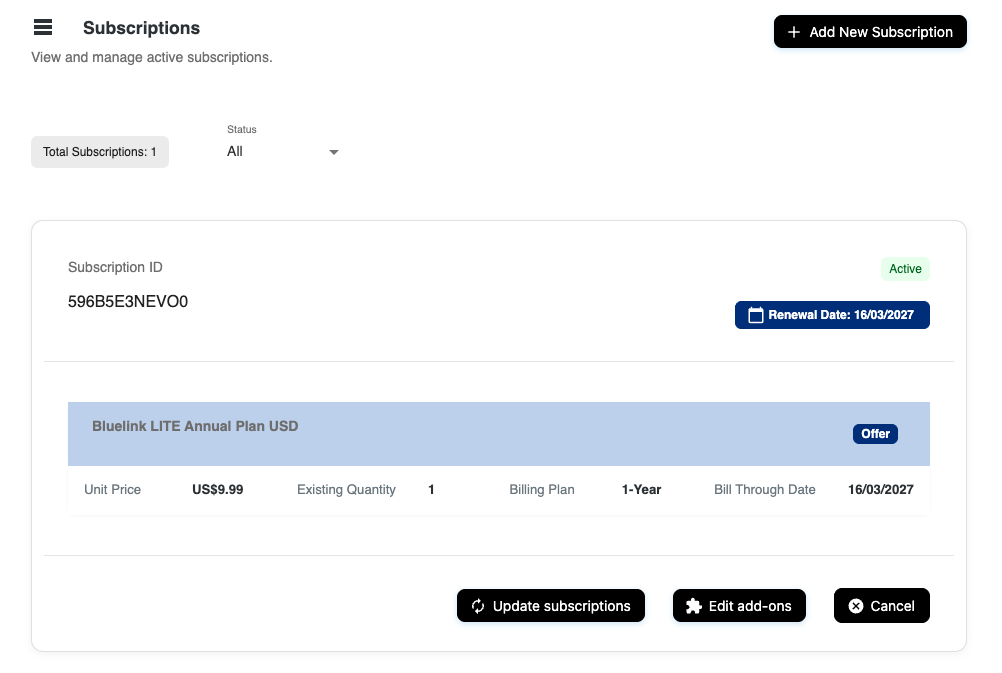
Subscribers see a complete view of their active subscriptions — plan details, pricing, renewal dates, and status — all pulled from Stripe Billing in real time. For businesses with multiple products or subscription tiers, the portal supports multi-subscription views, so a subscriber with both a base plan and an add-on sees everything in one place.
Payment method management
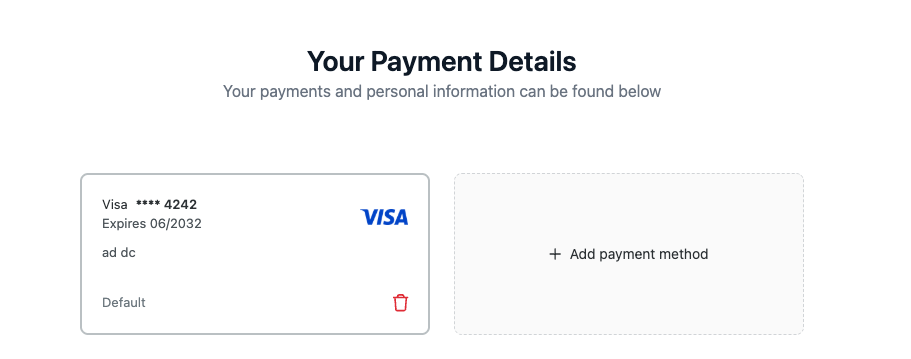
Subscribers can add new payment methods and manage existing ones using Stripe's Payment Element, rendered natively within the Limio self-service form. This means full support for cards, ACH, SEPA, and any payment method configured in your Stripe account. Subscribers can choose whether a new payment method becomes their default, and saved payment methods display consistently with card brand, last four digits, expiry, and cardholder name — regardless of whether the method was captured through Limio or directly through Stripe.
Billing and delivery address management
Billing addresses are tied to payment methods; delivery addresses are available for physical subscription products. Both are editable through the self-service form, with extended field support including mobile phone, work phone, and work email. Address changes sync automatically to Stripe and, if configured, to Salesforce.
Intelligent cancel/save journeys
This is where a commerce platform earns its place in your stack. Rather than presenting a single "cancel" button that processes an immediate cancellation, Limio enables you to build multi-step cancel/save journeys that maximise retention while respecting the subscriber's choice.
How it works
Limio's Journeys engine routes subscribers through personalised cancel flows based on data you already have: which offer they're subscribed to, which customer segment they belong to, their subscription tenure, their location, or any custom criteria. Each step of the journey is a Limio Page — built with the same no-code page builder — so your retention team controls the experience without writing code.
A typical cancel/save flow might look like this:
Step 1: Reason capture. The subscriber selects why they want to cancel — too expensive, not using it enough, switching to a competitor, missing features. This data feeds directly into your analytics and Salesforce, giving you actionable insight into churn drivers.
Step 2: Personalised retention offer. Based on the cancel reason (and optionally the subscriber's segment or plan), the journey surfaces a targeted offer. If the subscriber says "too expensive," you might present a discounted plan or a pause option. If they say "not using it enough," you might suggest a downgrade to a lighter tier. If they say "missing features," you might surface a contact form connected to your product team.
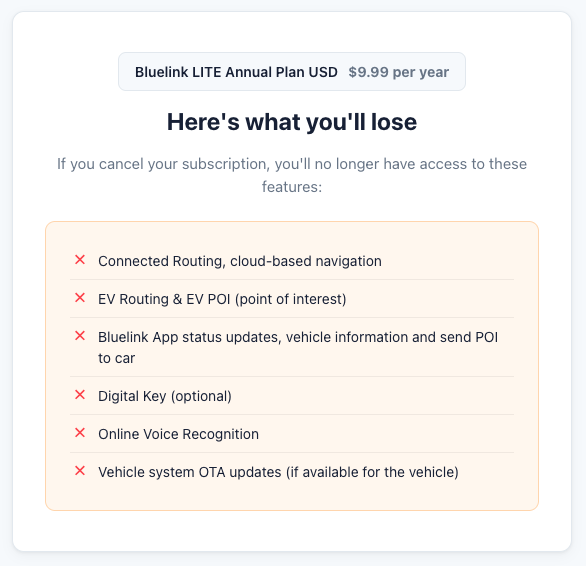
Step 3: The choice. The subscriber can accept the retention offer (which processes as either a discount applied to their current subscription or a switch to a new plan), proceed with cancellation (effective immediately or at end of term), or reach out to your team via an embedded contact form or live chat link.
Every step is configurable. You decide how many steps, what content appears, which offers are surfaced, and how the routing logic works. Some businesses run a simple two-step flow (reason → offer). Others build elaborate multi-branch journeys that adapt to the subscriber's entire history. Limio handles both.
Cancel reasons as a strategic asset
The cancel reasons captured through these journeys aren't just a formality - they flow to Limio's cancel/save analytics dashboard and to Salesforce. Your team can see the most common cancel reasons, the save rate by reason, which retention offers are most effective, and the breakdown of cancellations processed online versus through customer service. This data turns churn from a metric you report on into a process you actively optimise.
Smooth upgrade and downgrade paths
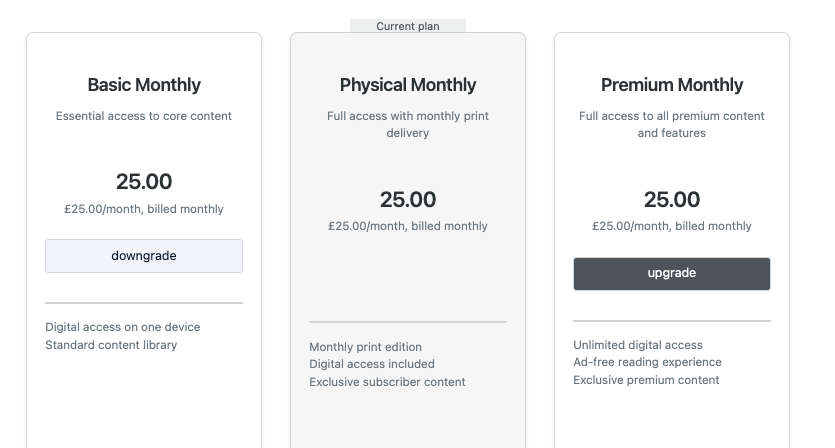
Limio lets you define explicit upgrade and downgrade paths at the offer level — specifying which plans a subscriber can switch to from their current subscription. This means you control the experience: a subscriber on your basic plan sees only the upgrade options you've approved, with pricing, proration, and switch dates configured in advance.
Upgrades and downgrades are processed through the self-service form, which handles the order submission and communicates with Stripe Billing to create the new subscription with appropriate proration. Switch offers can include promotional pricing (a discounted rate for the first three months of the upgraded plan, for example), and the switch date can be configured as immediate or at the end of the current billing period.
The switch experience is built with Limio's subscription info and switch subscription components — the subscriber sees their current plan alongside the available alternatives, compares pricing and features, and completes the switch in a single flow. No redirects to a separate page. No calls to customer service. No engineering involvement to add a new upgrade path.
Add-on management, restart, and renewal flows
Beyond plan switches, the self-service portal supports add-on purchases (subscribers can add complementary products to their existing subscription), subscription restarts (re-activating a previously cancelled subscription), and renewal management. These flows use the same component library and page builder, giving your team a consistent toolset for the entire subscriber lifecycle.
Salesforce integration: full lifecycle visibility
Every action a subscriber takes in the self-service portal — upgrading, downgrading, cancelling, accepting a save offer, changing their address, updating their payment method — flows to Salesforce as a Platform Event. This isn't a batch sync or a nightly import; it's real-time event-driven integration.
What your customer service team gets
When a subscriber calls your support line, the agent sees the complete picture in Salesforce via Limio for Salesforce: current subscription, order history, any recent self-service actions (did the subscriber try to cancel online and accept a retention offer?), and the source of each order (online shop or Salesforce). Agents can perform the same actions the subscriber can — switches, cancellations, cancel/save flows — using the same offer catalogue and business rules, directly from Salesforce.
This symmetry is critical for B2C businesses. Whether a subscriber manages their account online or through customer service, the experience is consistent and the data is unified. No more "the website says one thing but our CRM says another."
What your marketing team gets
Cancel/save data with reasons, switch order data, and renewal data all flow to Salesforce with full attribution. Your marketing team can segment subscribers by their lifecycle actions (who downgraded last month? who accepted a retention offer? who upgraded from basic to premium?) and run targeted campaigns based on real behaviour, not assumptions.
What your operations team gets
Limio's commerce analytics provide a real-time view of self-service activity: cancel/save rates and trends, save offer effectiveness by offer type, switch order volume and revenue impact, and source attribution (how many cancellations happen online versus through customer service). All reports are exportable and available through the Limio analytics dashboard.
Analytics and reporting
Limio provides dedicated analytics views for each lifecycle event type:
Cancel and save orders track cancellation volume, save rates, cancel reasons, the most effective retention offers, and the revenue retained through successful saves. Each order shows whether it originated from the online portal or from a Salesforce agent.
Switch orders track upgrade and downgrade volume, the most popular switch paths, and the revenue impact of plan changes. Switch reason data (captured when a cancel/save flow results in a plan change rather than a discount) gives additional context.
New and renew orders track acquisition and renewal performance with UTM attribution, so you can see the full funnel from campaign to conversion, across both online and Salesforce channels.
All analytics data is exportable and designed to complement your existing BI and reporting stack. For businesses that centralise reporting in Salesforce, the Platform Event integration ensures the same data is available in your CRM for custom reporting and dashboarding.
Security, compliance, and operational confidence
The self-service portal inherits the same security posture as the acquisition experience: reCAPTCHA bot protection on sensitive forms, rate limiting on API endpoints, PCI-compliant payment handling through Stripe's Payment Element, and modern browser requirements aligned with PCI DSS 4.0 standards. Subscriber authentication is handled through your identity provider (Auth0, AWS Cognito, Microsoft Azure, or others), with Limio supporting SSO and OAuth flows natively.
How it works: architecture overview
The architecture mirrors the acquisition flow:
Your Self-Service Portal (Limio Commerce Layer) → Stripe Billing → Salesforce CRM
Limio serves the subscriber-facing self-service experience on your domain. When a subscriber takes an action — upgrading, cancelling, accepting a save offer — Limio processes the change through Stripe Billing via Stripe Connect and simultaneously sends the event to Salesforce via Platform Events. Your commercial team manages the self-service pages, cancel/save journeys, retention offers, and upgrade paths in Limio. Stripe handles the billing. Salesforce provides the operational view.
Getting started
If you're running a B2C subscription business on Stripe Billing and your subscribers deserve more than a basic billing portal, Limio connects via Stripe Connect and gives your commercial team no-code control over the entire post-purchase experience.
Book a demo to see how Limio turns self-service from a cost centre into a retention engine — with intelligent cancel/save journeys, branded lifecycle management, and full Salesforce visibility.
Your subscription business, on autopilot.
See how Limio can transform your commerce capabilities.